
Introduction
Well, if you’ve been reading Copper App reviews, you’re probably wondering if this CRM is still worth your time in 2025. Honestly, it’s pretty popular for working smoothly with Google Workspace, which makes handling emails, meetings, and client stuff a lot easier for busy teams.
I’ve personally noticed that a lot of users love its simple layout and the smart automation that actually saves time. But, some people feel it could be more flexible with customization or pricing. So basically, before you decide, let’s dive into the latest Copper App reviews (2025) — from real users sharing what really works and what doesn’t.
Table of Contents
ToggleWhat Is Copper App and Who Is It For?
A Google-First CRM Built for Simplicity
So basically, the Copper App is a CRM made with Google Workspace users in mind. I’ve personally noticed how smoothly it links with Gmail, Calendar, and Drive, which makes handling clients feel a lot less stressful. A lot of people in Copper App reviews even mention that it just fits naturally into their daily workflow — no extra hassle, no jumping between tools.

Designed for People, Not Tech Experts
Unlike complex CRMs like Salesforce, Copper keeps things light and easy to understand. It’s made for small businesses and growing teams that don’t want to spend hours learning a new system. Everything just works — right inside your inbox.
Automation That Saves Time
Copper automates the boring stuff. It logs emails, tracks follow-ups, and updates contacts automatically. You can focus on conversations instead of data entry — a feature that gets praised repeatedly in Copper App Reviews.
Perfect Fit for Small Teams and Startups
So basically, Copper is awesome for small to mid-sized businesses, freelancers, and startups. I’ve personally noticed that if your team lives in Gmail all day, Copper just slides right into your workflow. It doesn’t feel like some extra complicated tool — it’s just there, making life a bit easier. It keeps everyone aligned and helps you close deals faster.
The Official Google-Recommended CRM
Copper isn’t just compatible with Google — it’s officially recommended by Google. That means setup takes minutes, and syncing happens instantly through your Google account. For teams already using Google tools, it feels like an upgrade, not an add-on.
Beyond Sales: Great for Marketing and Agencies
Marketers, consultants, and agencies use Copper to manage campaigns, track leads, and nurture clients — all from one place. It’s simple, visual, and quick to learn. As many users say, “it feels like Gmail with superpowers.”
Ideal for Teams That Value Speed and Clarity
If your goal is to stay organized without dealing with tech headaches, Copper hits the sweet spot. It’s not overloaded with unnecessary features — just the right tools to help your business grow smoothly and efficiently.
How Users Rate Copper App in 2025
Overall Ratings Stay Strong in 2025
Across major platforms, Copper App Reviews remain mostly positive. On average, Copper scores around 4.2 to 4.5 stars. Honestly, that just shows most users are pretty happy with how simple and reliable it is. I’ve noticed that small business owners and startups, in particular, seem to rave about it the most.Users Appreciate the Smooth Google Integration
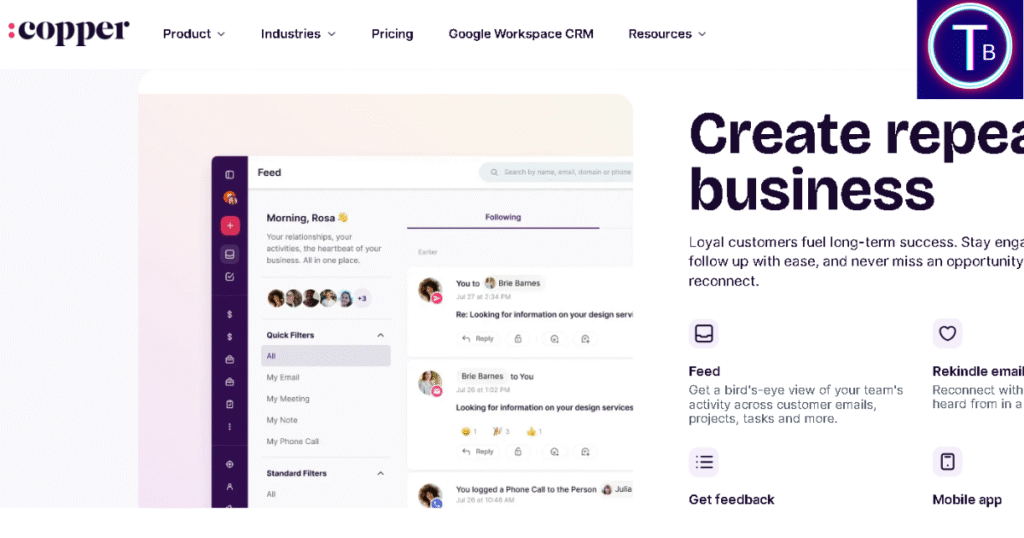
One thing I’ve noticed in pretty much every Copper review is how effortlessly it links with Google tools. People love that it feels like it’s just part of Gmail — no tricky setups, no extra extensions, nothing you have to force yourself to figure out.
Ease of Use Earns Consistent Praise
A lot of people actually describe Copper as “refreshingly easy to use.” Honestly, its clean layout and simple navigation make it really beginner-friendly — you don’t have to spend hours figuring things out. Even teams without CRM experience say they were able to get started in a single day.
Performance Gets High Marks from Mobile Users
The Copper mobile app has gained noticeable improvement in 2025. People often mention that Copper loads faster, has fewer sync issues, and makes tracking deals on the go much smoother. I’ve noticed this is a big win for sales reps who travel a lot or work remotely — it just keeps everything running without extra hassle.
Customer Support Reviews Are Mixed
Some people really praise Copper’s support team for being friendly and helpful. But, I’ve also noticed that a few users mention slower responses during busy periods. It’s one of the few things where opinions really differ in Copper App reviews.
Pricing and Value Spark Discussion
One thing that keeps coming up in 2025 Copper reviews is the cost. Honestly, most small teams feel the pricing is fair for the convenience it brings. But, I’ve noticed a few users say it can feel a bit pricey if your operation is really tiny. Still, most agree the time saved offsets the monthly cost.
Users Highlight Consistency and Reliability
Long-term users often point out that Copper has stayed stable and reliable over the years. Updates come regularly, bugs are rare, and overall performance stays solid — which is exactly why many professionals keep using it year after year.
What People Love: Google Integration & Ease of Use
Built Seamlessly for Google Workspace
So basically, the biggest reason people love Copper is how smoothly it works with Google Workspace. It links right into Gmail, Calendar, and Drive, making it feel like it’s just part of your usual Google setup. I’ve personally noticed that many Copper App reviews mention this as the feature that saves the most time day-to-day.
Effortless Setup with One Login
You don’t even need IT support to get going. People just sign in with their Google account, and Copper syncs everything automatically — emails, meetings, contacts, all of it. Honestly, this one-click setup is a huge reason why small teams love it over more complicated CRMs.
Everything Happens Inside Gmail
Unlike most CRMs that pull you into separate dashboards, Copper stays right inside Gmail. You can glance at client details, add quick notes, or move deals along — all without leaving your inbox. I’ve personally noticed that reviewers really love how it keeps their workflow smooth and uninterrupted.
Clean and Simple Interface
Users consistently praise Copper’s design. The interface is modern, uncluttered, and easy to navigate — even for first-time CRM users. From what I’ve seen in Copper App reviews, this simplicity really helps teams stay focused and cuts down on the time needed for training.
Teamwork That Just Works
Copper makes teamwork feel natural. Shared pipelines, notes, and reminders make it easy for everyone to stay on the same page. I’ve noticed reviewers often mention that even teammates who aren’t very tech-savvy pick it up quickly for tracking deals and keeping client updates organized.
Automation That Actually Helps
Automation in Copper doesn’t feel forced or confusing. It quietly updates tasks, logs emails, and tracks deals in the background. Users say it saves hours every week without them even noticing the system working.
Feels Familiar for Google Users
Since most professionals already use Gmail daily, Copper feels like an upgrade, not a new tool. It adopts the same design language and workflow style, which is why many reviewers describe it as “Gmail with built-in CRM power.”
Common Complaints and Limitations
Customization Feels a Bit Limited
Honestly, Copper is really easy to get started with, which is awesome. But yeah, sometimes it can feel a bit restrictive. I’ve noticed in some Copper App reviews that power users wish they had more freedom to tweak pipelines, fields, and workflows exactly how they like. For growing teams, this limitation can be a hurdle.
Pricing Feels High for Small Teams
A common gripe I’ve noticed among freelancers and tiny businesses is the cost. Honestly, Copper gives good value for what it offers, but some very small teams feel the pricing can be a bit steep. However, many still justify the cost for its Google integration and time-saving features.
Reporting Tools Need Improvement
Many reviewers appreciate Copper’s clean dashboards but wish for deeper reporting features. They want more advanced analytics, visual charts, and filtering options to measure team performance more effectively.
Integration Beyond Google Is Limited
Copper shines with Google apps but lacks strong native integrations with tools like Slack, Trello, or Notion. Some Copper App Reviews mention using third-party connectors to fill these gaps, which adds extra setup time.
Customer Support Response Time Varies
Users share mixed experiences when contacting support. Some users get help really fast, but others notice slower responses during busy times. It’s not a dealbreaker, but honestly, I’ve seen in Copper App reviews that people hope support gets a bit quicker in 2025. Sync Delays Happen with Bigger Accounts
A few users with big data sets report slow syncing or minor lags when updating records. Though rare, it’s one of those small technical issues that pop up in long-term Copper App Reviews from larger teams.
Mobile App Still Catching Up
The mobile app has really improved over time, but some reviewers still feel it’s missing a few desktop features. Honestly, people would love better offline access and quicker navigation when handling deals on the go.
Performance and Mobile Experience
Fast and Reliable for Daily Use
Users consistently report that Copper runs smoothly, even with multiple team members working at once. It loads quickly, handles large contact lists efficiently, and rarely crashes — a big plus for teams that rely on it daily for customer tracking.
Stable Cloud-Based Performance
Because Copper is built entirely in the cloud, data syncing happens in real time. Businesses love how updates appear instantly across Gmail, Calendar, and other linked apps. This kind of reliability is one of the reasons Copper has become a favorite for remote and hybrid teams.
Improved Mobile App in 2025
The Copper mobile app has come a long way. In 2025, users really notice the faster load times and cleaner design. Honestly, it’s much easier to check deals, add notes, and glance at pipelines while traveling — which makes Copper perfect for salespeople who are always on the move.
Offline Access Still Needs Work
One area where users see room for growth is offline functionality. The app works perfectly online, but it offers limited options when internet access drops — something field teams occasionally mention in user feedback.
Smooth Integration Boosts Speed
Because Copper connects directly with Google tools, there’s almost no lag between platforms. Emails, events, and client updates appear instantly. This seamless performance saves time and keeps teams from losing focus while switching apps.
Minimal Bugs and Downtime
Compared to many CRMs, Copper has a strong record of stability. Users mention very few bugs or outages. Even after major updates, performance remains consistent — a sign that the developers prioritize quality control.
Perfect for Fast-Paced Teams
Teams that need speed and reliability find Copper to be a great fit. It doesn’t bog down your workday or need a lot of upkeep. Whether you’re handling deals from your desk or checking them on your phone, Copper stays fast, responsive, and super easy to use.
Customer Support and User Satisfaction
Responsive but Sometimes Slow During Peak Hours
Most users describe Copper’s customer support as friendly and helpful. However, response times can vary — quick on regular days but slower during busy periods. Many teams appreciate the effort but hope for more consistent speed.
Helpful Knowledge Base and Tutorials
Copper has a pretty extensive online help center with step-by-step guides and video tutorials. Honestly, new users often say these resources make getting started much easier without having to reach out to support. It’s a big help for teams who prefer solving issues independently.
Email Support Is Reliable, Live Chat Still Limited
While the email ticketing system works well, users mention that live chat availability could be expanded. Those who received support via chat found it efficient and polite — but not all users had access during their time zone.
Community Forum Adds Extra Value
Copper also has a super active online community where users share tips, workflow hacks, and quick fixes. Honestly, I’ve noticed that getting help from other users often solves small issues way faster than waiting for the official support team.
User Satisfaction Remains Strong
Honestly, yeah, there are a few tiny hiccups here and there. But most people genuinely like Copper. Once your team figures it out, everything just flows. I’ve noticed reviewers constantly mention how simple it is, how reliable it feels, and the regular updates — and that’s exactly why they stick with it.
Support for Google Integration Issues Is Excellent
One area where Copper truly shines is troubleshooting Google-related sync problems. Users mention that the support team quickly identifies and fixes Gmail or Calendar connection errors — showing their deep technical expertise in Google’s ecosystem.
Room for a More Personalized Experience
Some long-term users suggest adding dedicated account managers or premium support tiers for larger teams. They believe personalized onboarding and strategy sessions could make Copper even more valuable for growing businesses.
Best Features for Teams and Small Businesses
1. Seamless Google Workspace Integration
Copper works directly with Gmail, Google Calendar, and Drive — no extensions needed. Everything updates automatically, helping teams stay organized and connected.
2. Clean and Modern Interface
Users often describe Copper’s design as clean and refreshing. No confusing menus, no clutter — just the tools you actually need.
3. Easy Setup for New Teams
Small businesses love that setup takes minutes, not days. There’s no heavy onboarding or coding required — everything just works out of the box.
4. Smart Workflow Automation
Copper takes care of all those boring, repetitive tasks — things like follow-ups, reminders, and data entry. That way, your team can actually focus on selling instead of spending half the day typing things into a screen. It’s such a relief when the tech finally does the boring part for you.
5. Real-Time Collaboration Tools
What’s really cool is that multiple teammates can jump into the same deal or contact at once. Everyone stays in sync without flooding each other’s Slack or inbox. Honestly, it just makes teamwork feel smoother — like everyone’s finally working together instead of tripping over updates.
6. Centralized Contact Management
Copper automatically pulls client info from Gmail threads, so you never lose context. It keeps every conversation and attachment in one view.
7. Customizable Pipelines for Every Team
You can design your pipeline stages exactly the way your business operates. Whether it’s sales, marketing, or service — it adapts easily.
8. Visual Dashboards That Tell the Whole Story Instantly
Honestly, the dashboards look really cool — bright, interactive, and super easy to read. You don’t have to click through endless reports anymore. Managers can spot deals, catch bottlenecks, and notice trends in seconds without getting buried under data. It kind of feels like everything you need is right there, updating in real time.
9. Smart Email Tracking & Follow-Up Reminders That Actually Help
I’ve got to say, this feature feels like a lifesaver sometimes. Copper quietly shows you when someone opens your email and even gives you a nudge when it’s time to follow up. Honestly, it’s such a small thing, but it saves you from losing deals just because a message got buried somewhere. You know that “oh no, I forgot to reply” moment? Yeah, this totally fixes that.
10. Manage Deals Anywhere with Copper’s Mobile App
Whether you’re on the road or in a client meeting, the Copper mobile app keeps your sales workflow moving. It’s quick, reliable, and pretty much works just like the desktop version.
11. Staying Organized with Copper’s Task Tools
You can assign and track tasks right inside Copper. No need for separate project tools — it keeps your workflow simple and integrated.
12. Easy Reporting That Actually Makes Sense
Creating reports in Copper is super straightforward. You can filter by salesperson, deal stage, or revenue — which is perfect for keeping track of how a small team is performing.
13. Integration with Google Meet and Chat
Copper connects effortlessly with Google Meet and Chat, making internal communication a breeze. You can even schedule calls straight from your CRM without switching apps.
14. Secure Cloud-Based Platform
All your data stays encrypted and safe in Google Cloud. It gives peace of mind to small business owners handling client details.
15. Affordable Pricing for Startups
Compared to heavy CRMs like Salesforce, Copper’s pricing is friendly for startups. You get premium features without the premium cost.
16. Built for Non-Tech Teams
You don’t need to be a tech expert to use it. Copper is made for people who just want to get things done — not manage a complicated system.
17. Auto-Sync with Google Calendar
Every meeting, deadline, and event is synced automatically. No need to enter dates twice — it’s effortless and accurate.
18. Templates for Faster Communication
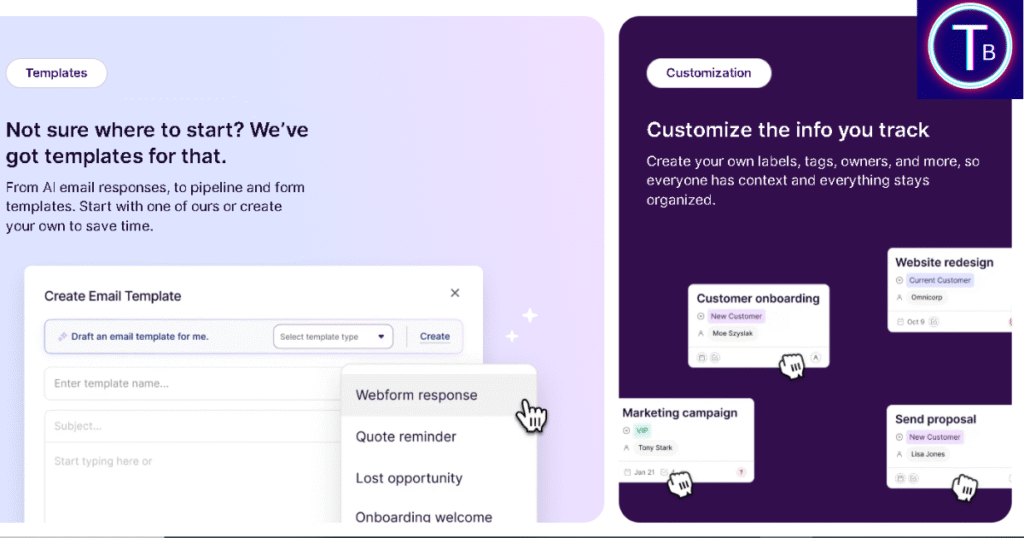
Copper offers email templates that save time. Teams can reuse messages while keeping personalization for clients.
19. Integration with Popular Apps
Beyond Google, Copper also hooks up effortlessly with Slack, Zoom, and QuickBooks — and honestly, that’s really cool. You know what I like most? It just works without you having to jump between endless tabs. I’ve heard so many users mention that Copper makes everything feel like it’s finally in one place — and honestly, once you try it yourself, you’ll see why everyone appreciates that kind of simplicity.
20. Regular Product Updates and Improvements
C The Copper team keeps things fresh by rolling out new updates regularly. It shows they listen to user feedback and genuinely care about improving small business productivity.
21. Excellent User Permissions and Roles
You can control who sees what. It’s perfect for growing teams where privacy and data control matter.
22. Smooth Data Import from Other CRMs
Switching over from HubSpot or Pipedrive? Honestly, Copper makes that move feel surprisingly easy. With its automated import tools and super clear step-by-step guides, you won’t have to stress about losing data or spending hours setting things up — it just works, smooth and simple.
23. Built-In Lead Scoring System
You can prioritize your leads based on how active they are or how valuable they seem — and honestly, that’s a game-changer. Instead of chasing random contacts, your sales team can focus on the ones that truly matter. I’ve seen it make sales pipelines smoother and way less stressful.
24. Activity Tracking Keeps Everyone Aligned
Copper automatically logs every email, meeting, and note. Managers can stay in the loop without constantly hovering — and honestly, that’s such a relief for everyone. It keeps things organized, the team feels trusted, and the whole workflow just runs way smoother.
25. Simple Yet Scalable Design
Copper starts light but grows with your team. Whether you’re two people or twenty, it keeps performance smooth and reliable.
Copper App vs. Competitors in 2025
Ease of Use That Honestly Outshines Most CRMs
You know what’s funny? When you stack Copper against giants like Salesforce or Zoho, it’s almost unfair — because Copper just feels so much easier.
Those other tools can get clunky real quick, with menus buried inside menus. But Copper? It keeps things clean, light, and surprisingly friendly, especially for smaller teams that don’t want to fight with their software every day.
Google Integration Still the Key Advantage
Copper’s deep connection with Google Workspace remains unmatched. Other CRMs might offer some integrations, but honestly, none feel as smooth and natural as Copper’s direct Gmail and Calendar sync.
Pricing Remains Competitive for Small Teams
Copper might not be the cheapest CRM out there, but it definitely gives solid value. Compared to HubSpot or Pipedrive, it offers all the essential features at a fair price without dumping extra stuff you don’t really need.
Customization Is Simpler but Limited
While competitors like Zoho or ClickUp CRM offer advanced customization, Copper focuses on straightforward flexibility. You can tailor pipelines and fields easily — but not at a developer’s level.
Automation Matches Higher-Tier Platforms
Surprisingly, Copper’s workflow automation can go toe-to-toe with bigger CRMs. You can automatically trigger follow-ups, update deals, and assign tasks — stuff that usually only comes with pricier plans on other platforms.
Mobile Experience Feels Smoother Than Most
Users often say that Copper’s mobile app feels snappier and more polished than the competition. You can easily access contacts, deals, and pipelines without losing any key features, even on smaller screens.
Support Quality Beats Many Mid-Tier CRMs
Copper’s customer support may not have 24/7 live chat yet, but it still scores higher in friendliness and accuracy compared to larger CRMs where tickets often get lost in queues.
Ideal for Google-Focused Businesses
If your company already uses Gmail and Google Drive daily, Copper App naturally fits in. Competitors often require additional setup or extensions to achieve the same smooth workflow.
Not Perfect for Large Enterprises
For massive corporations needing deep analytics and multi-department management, tools like Salesforce or HubSpot Enterprise still have the edge. Copper remains best for small to medium-sized teams.
Balanced Choice for Modern Teams
In 2025, Copper App positions itself as a balanced, modern CRM — not overloaded, not underpowered. It’s the sweet spot for teams that value simplicity, automation, and reliable Google integration over fancy dashboards and hidden costs.
What Long-Term Users Say About Copper
Consistency Over the Years Impresses Users
Many long-term users say Copper App has stayed remarkably stable over time. It doesn’t crash often, updates rarely break things, and its clean interface keeps everyday work smooth.
Learning Curve Remains Low Even After Updates
Unlike other CRMs that get complicated with every new version, Copper CRM remains easy to navigate. Long-time users appreciate that the design evolves without adding confusion.
Google Integration Keeps Getting Better
Veteran users agree — Google integration is still Copper’s biggest win. Whether it’s syncing contacts or tracking emails in Gmail, Copper makes it effortless.
Performance Is Reliable for Daily Use
Long-time users say Copper has really leveled up over the years. It runs super smoothly now — no lag, no crashes — even when you’re juggling hundreds of deals. I’ve seen people mention they use it daily on regular laptops or even phones, and it just keeps up without any drama.
Customer Support Has Become More Responsive
You know what’s nice? Copper’s support team has seriously stepped up their game. A few years back, users complained about slow replies — but in 2025, things feel totally different.
Now, responses come in quicker — and the support team actually helps instead of throwing those boring canned replies at you. Honestly, that’s such a big win for anyone who depends on Copper every single day. It just feels more human now, you know?
Reporting Features Still Need Refinement
Loyal users appreciate Copper’s simplicity but admit reporting hasn’t improved as much as they hoped. They still rely on spreadsheets or Google Data Studio for deeper analytics.
Automation Saves More Time Than Ever
Users who’ve upgraded to the latest version note stronger automation tools. Tasks that once required manual follow-ups now run automatically — a real time-saver for sales teams.
Customization Options Have Grown Gradually
Earlier versions felt rigid, but long-term users notice steady improvement. You can now tweak pipelines, add custom fields, and personalize dashboards without extra plugins.
Mobile App Keeps Getting Updates That Matter
Veteran reviewers praise Copper’s mobile app for becoming faster, more stable, and feature-rich each year. It’s reliable enough now to manage deals entirely on the go.
Still Ideal for Small, Growing Teams
Even after years, long-time users say Copper App continues to be a perfect fit for small and mid-sized teams. It’s affordable, reliable, and simple — without unnecessary enterprise features.
Users Appreciate Copper’s No-Nonsense Approach
Those who’ve used CRMs like Salesforce or HubSpot often return to Copper for one reason — clarity. It does what a CRM should do, without extra clutter or confusing menus.
Loyal Users Say It’s Worth Sticking With
Long-term customers highlight one key takeaway: Copper App grows with you. It doesn’t demand constant retraining or expensive add-ons — it just works year after year.
Final Verdict – Is Copper App Worth It?
After reading through tons of Copper App reviews (2025), it’s clear that this CRM is still a top choice for teams who care about simplicity, speed, and smooth Google integration. It’s not as heavy as Salesforce or as pricey as HubSpot — instead, it focuses on what small and growing businesses actually need: easy automation, smooth collaboration, and reliable daily performance.
Sure, there’s some room to improve reporting and customization, but overall, Copper hits the sweet spot between usability and power. If your workflow already runs on Gmail and Google Workspace, Copper App is definitely worth giving a try this year — it brings real value without all the extra clutter.
FAQs: Copper App Reviews (2025)
Q1: Is Copper App safe to use for my business?
Honestly, yes — Copper is pretty solid when it comes to security. It stores everything safely in the cloud and syncs directly with Google Workspace. I’ve seen small teams rely on it for years without any major security hiccups, which says a lot. It just feels stable and trustworthy for growing businesses.
Q2: Does Copper integrate with Gmail and Google Calendar?
Honestly, that’s where Copper really shines. It syncs with Gmail and Google Calendar like magic — everything just falls into place automatically.
Q3: Can small businesses afford Copper App in 2025?
You know what, for most small and mid-sized teams — yeah, it’s pretty fair. It’s not the cheapest out there, but honestly, with all the automation and time it saves, people usually feel it’s worth every bit. Freelancers might think twice, but for small teams, it’s a solid investment.
Q4: Is Copper App better than competitors like Salesforce or HubSpot?
If you’re after something fast, simple, and Google-friendly, then yes — Copper definitely holds its own. It’s not trying to be a massive enterprise CRM like Salesforce. Instead, it focuses on what smaller teams actually need: speed, automation, and a clean interface that doesn’t slow you down.